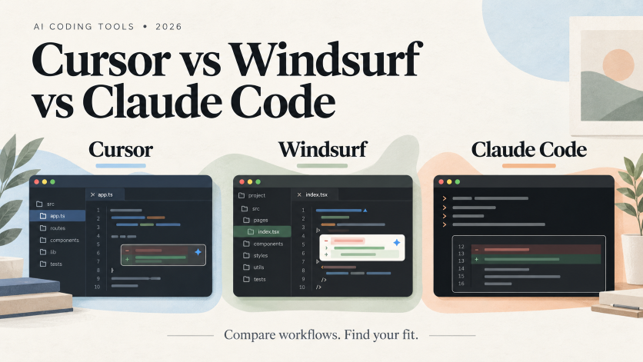
Cursor vs Windsurf vs Claude Code: Which AI Coding Tool Is Best?
October 12, 2026
0
Check out our previous blog to refresh: Existing comparison The Cursor vs Windsurf vs Claude Code decision starts with what you want to delegate. Finishing a function, fixing
The Cursor vs Windsurf vs Claude Code decision starts with what you want to delegate. Finishing a function, fixing a failing test, and implementing a feature across several files require different levels of assistance. A useful comparison should distinguish those jobs.
Start with Cursor if you want to autocomplete and agent-assisted editing in one editor. Consider Windsurf’s successor, Devin Desktop, if managing local and cloud agents is central to your workflow. Evaluate Claude Code if you want a coding agent that works through your terminal or integrates with your existing IDE. These are workflow recommendations. Code quality is a separate question.
There is also a naming change to understand. Cognition introduced Devin Desktop as the next generation of Windsurf in June 2026. This article uses “Windsurf” where it helps readers recognize the product, while evaluating its current successor.
Cursor vs Windsurf vs Claude Code at a Glance
Dimension
Cursor
Windsurf / Devin Desktop
Claude Code
Main working environment
AI code editor, with additional agent interfaces
Full IDE with an agent-management interface
Terminal, IDE integrations, desktop app, and browser
Assistance while typing
Cursor Tab
Tab completions and inline edits
Task-driven assistance; not a direct replacement for Tab completion
Delegated work
Agent can search code, edit files, and run commands
Manage local and cloud agents alongside the editor
Agent can read files, make changes, and run commands
Model options
Select an available model for agent tasks
Model chosen per task, plus compatible external agents
Claude models, subject to account and configuration
Entry paid subscription
Pro: $20/month
Pro: $20/month
Claude Pro: $20/month, including Claude Code
Monthly USD prices checked on October 10, 2026. Included usage and additional charges differ, and identical subscription prices come with different allowances.
This Cursor vs Windsurf vs Claude Code comparison draws on published research and official documentation.
The practical comparisons focus on three jobs: adding a feature across files, diagnosing a failing test, and refactoring without changing behavior. The questions are straightforward: what can the tool execute, how can you inspect its changes, and what still needs your intervention?
Speed alone cannot establish a winner. A quick patch that changes the wrong behavior creates more work. Model choice, permissions, repository instructions, and test coverage also affect the outcome. Our recommendations distinguish documented capabilities from conclusions about workflow fit.
Everyday Coding: Completion, Edits, and Review
Cursor’s Suggestions While You Work
Cursor Tab suggests code using recent edits, surrounding code, and linter errors. It can propose multiline changes, add imports, and suggest related edits in other files. You accept or reject those suggestions as you work.
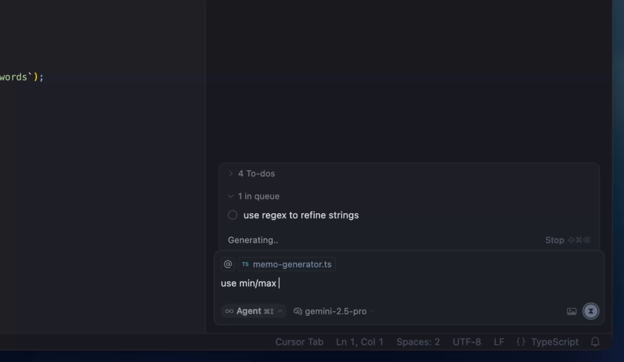
For a larger change, Cursor Agent can search the codebase, edit files, and execute terminal commands. This makes Cursor a good fit when your day moves between writing code yourself and delegating a defined task.
Devin Desktop retains a full editor but makes managing agents a prominent part of the interface. Its Agent Command Center brings local and cloud work together, while Spaces let related agents share context. It also supports compatible external agents through the Agent Client Protocol.
The practical distinction is how you organize work: inspect and edit code directly, or delegate tasks and review their progress from the same environment. A good interface still leaves output quality to be judged separately.
Claude Code now reaches beyond the terminal. Its VS Code extension provides a graphical interface with inline diffs, file references, and plan review. The documentation also supports installation in Cursor and Devin Desktop.
This changes the Claude Code vs Cursor question. You can use Claude Code within Cursor rather than replace the editor. First decide whether your main need is suggestions while typing or an agent that carries out a task. Then compare how comfortably you can direct, inspect, and correct its work.
Walking Through Three Development Tasks
All three tools support agentic coding workflows across multiple files. The useful distinction is how you direct that work, inspect the changes, and verify the result. The scenarios below walk through documented workflows.
Adding a Feature Across Multiple Files
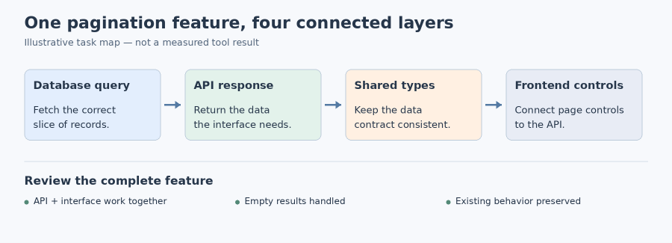
Consider adding pagination to a customer dashboard. The change may touch a database query, an API response, shared types, and frontend controls. Updating the visible component alone would leave the feature incomplete.
Claude Code supports exploring the relevant files, planning changes, implementing them, and running checks. Its workflow documentation recommends examining how components interact and reviewing a plan before editing. You can direct that process through the terminal or an IDE integration.
Cursor lets you delegate the implementation to Agent, which can search the repository, edit code, and run terminal commands. This makes it a reasonable option when you want to move between agent-generated changes and direct editing within the same workspace. Its Agent documentation describes those execution capabilities.
Windsurf’s successor, Devin Desktop, emphasizes managing local and cloud agents together. For a feature with separate backend and frontend work, that interface offers a way to organize related sessions and inspect their changes. Spaces share context between agents, but you still have to check that the backend and frontend changes fit together. See Devin Desktop’s workflow overview.
For this task, define completion precisely: pagination must work through the API and interface, handle empty results, and preserve existing behavior. Otherwise, a convincing demo may hide an unfinished implementation.
Diagnosing and Fixing a Failing Test
Suppose a test fails because a date conversion shifts a booking into the previous day. The agent needs to reproduce the failure, trace the conversion, and correct the behavior.
Cursor Agent and Claude Code can execute commands, so either can participate in a run, inspect, edit, and rerun cycle. Claude Code’s debugging guidance specifically recommends supplying the reproduction command and explaining whether the failure is consistent or intermittent.
With Devin Desktop, the comparison centers on how clearly you can follow a delegated investigation and review its resulting diff. Its interface supports monitoring agent work and reviewing and shipping the results from the same place.
Judge the fix by the behavior it restores. Check whether the agent corrected the conversion, weakened an assertion, skipped a test, or changed unrelated code. A passing test suite is useful evidence, but the patch still needs review against the original requirement.
Refactoring Without Changing Behavior
Extracting duplicated validation into a shared helper sounds simple. The difficulty is preserving error messages, return values, and edge cases across every caller.
Cursor’s project rules let you supply codebase conventions and architecture guidance. Claude Code’s project instructions serve a similar purpose; its refactoring guidance recommends small, testable increments. Devin Desktop provides an environment for reviewing the diffs produced by its agents.
Give each tool the same boundary: preserve the public interface, avoid unrelated cleanup, and run the relevant checks. A useful patch should make the intended change easy to inspect. Broad rewrites add review work even when the code appears cleaner.
Repository-Level Understanding and Model Choice
A tool can access a repository without holding every relevant file in the model’s active context. Finding the right code, retaining task information, and following project conventions are separate concerns.
Cursor Agent includes codebase-search tools. Its version-controlled rules can carry architecture decisions and file-specific instructions. Claude Code supports persistent project guidance through CLAUDE.md or AGENTS.md, alongside auto memory for accumulated preferences and corrections. Devin Desktop’s Spaces allow related agents to share context.
Model choice also complicates an AI coding tools comparison. Cursor lets you select an available agent model. Devin Desktop selects a model for each task and can run compatible external agents, while Claude Code supports model selection through controls such as /model, subject to account access and organizational restrictions.
Compare the configurations you would actually use. A result from one model, permission setup, or product version should not become a blanket claim about the tool. Larger context windows and more agents are features to test against your own code.
Pricing and Usage Limits: What You Actually Pay For
All three have a $20 monthly entry subscription, but they do not provide interchangeable usage allowances. Compare what happens when you reach a limit, not just the price shown beside “Pro.”
Cursor’s Included Usage and Optional Spending
Cursor Pro costs $20 per month. Its plans include model usage, with on-demand usage available after the included amount is consumed and billed afterward. Teams starts at $40 per user monthly.
Check additional services separately. Cursor lists Bugbot on usage-based billing, so a Pro subscription should not be treated as an unlimited allowance for every feature.
Daily and Weekly Quotas on Windsurf and Devin Desktop
Devin Pro costs $20 monthly; Max costs $200. Pro allowances refresh daily and weekly, while Max uses a weekly allowance with no daily cap. Consumption varies with the model, task complexity, and reasoning required. Usage beyond the quota runs on pay-as-you-go credits.
The free plan includes limited agent usage, Devin Review, and DeepWiki. Teams starts at $80 per month, with full developer seats at $40 each, according to Devin’s billing documentation. Two full seats meet the $80 minimum, so the floor mostly affects very small teams.
Claude Code Subscription Versus API Billing
Claude Pro costs $20 with monthly billing and includes Claude Code. Max starts at $100 monthly with higher usage allowances. Claude Code also supports Console/API access, where spending follows usage rather than the Pro subscription price.
Its cost documentation makes an important distinction: a session’s estimated API-equivalent cost is not a Pro or Max subscriber’s bill. Check your actual billing route and remaining allowance before interpreting a dollar figure shown inside the tool.
Cursor vs Windsurf vs Claude Code: Which Fits Your Workflow?
Choose Cursor when you want suggestions while typing and delegated coding tasks within the same editor. Its combination of Tab and Agent makes it a sensible starting point for developers who alternate between direct editing and handing off work.
Look at Windsurf’s successor when organizing agent work is a priority. Devin Desktop’s local and cloud sessions, shared Spaces, and full IDE suit an evaluation centered on delegation and review. Its free plan also lets you try the editor before paying.
Choose Claude Code when you want a task-driven agent through your terminal or an existing supported IDE. As an AI terminal coding agent, it suits command-heavy debugging, refactoring, and scripted workflows. That recommendation rests on documented capabilities. Patch quality still needs your own trial.
Combining tools can make sense when each has a clear job. For example, Cursor can supply autocomplete while Claude Code handles delegated tasks through its extension. Check the separate subscription and usage costs before adopting both.
The best AI coding assistant is the one whose changes you can review quickly. Trial your shortlisted tools on the same feature, bug, and refactor, and record review time alongside execution time, since an impressive first draft can become a costly patch.
Frequently Asked Questions
Is Windsurf the Same as Devin Desktop?
Devin Desktop is Cognition’s next generation of Windsurf, announced in June 2026. Existing Windsurf users receive it as an update, and their plan, pricing, and extensions stay the same.
Can I Use Claude Code Inside Cursor or Windsurf?
Yes. Claude Code’s official extension documentation supports Cursor and Devin Desktop. You can also run its CLI in an integrated terminal. Claude Code usage stays separate from your editor subscription.
Is Windsurf Still Cheaper Than Cursor?
Their current entry paid plans both cost $20 monthly. Devin Desktop’s free plan and usage quotas differ from Cursor’s allowances, so value depends on your actual workload.
Which Tool Is Best for Large Repositories?
This comparison does not establish a measured winner. Evaluate whether each tool finds the right dependencies, follows project instructions, and preserves behavior across a representative change. Repository size or context-window capacity alone cannot settle that decision.