

Windsurf AI Review 2026: Is Codeium’s Editor the Dark Horse of AI Coding?
- June 2, 2026
- 0
Most of the attention in the AI coding space has gone to Cursor and, before that, GitHub Copilot. Windsurf, built by the team at Codeium, has been quietly
Most of the attention in the AI coding space has gone to Cursor and, before that, GitHub Copilot. Windsurf, built by the team at Codeium, has been quietly
Most of the attention in the AI coding space has gone to Cursor and, before that, GitHub Copilot. Windsurf, built by the team at Codeium, has been quietly growing in the background, and at this point, it deserves a serious look rather than a footnote.
This review is written after using Windsurf as a primary editor for four weeks on two active projects, a Python FastAPI service and a TypeScript React application. The findings are mixed in some areas and genuinely positive in others, which is why this article exists. The hype-versus-reality gap on Windsurf is real and worth examining carefully.
Windsurf is an AI-native code editor built by Codeium, the company behind one of the more popular free GitHub Copilot alternatives. It launched in late 2024 and gained traction through 2025 primarily because of one thing: a generous free tier that gives developers meaningful access to the editor’s core AI features without paying immediately.
Like Cursor, Windsurf is built on a VS Code foundation. Migration from VS Code brings over your extensions, keybindings, and settings. The editor looks and behaves like VS Code with an additional AI layer, familiar enough that there is almost no onboarding friction for developers already using VS Code.
Where Windsurf differentiates itself from Cursor is in its emphasis on what Codeium calls “Flow,” a design philosophy centered on keeping AI assistance within the natural movement of writing code rather than interrupting it for explicit prompts. In practice, this means the AI layer is designed to feel more passive and less attention-demanding than Cursor’s more explicit Composer workflow.
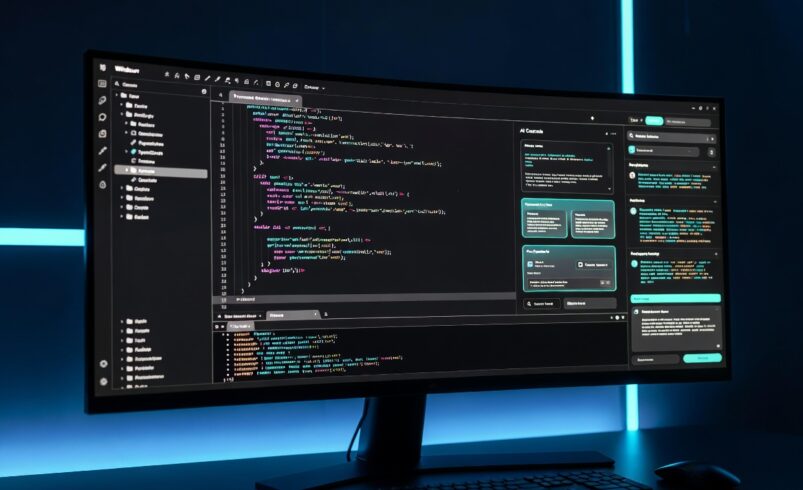
The first few days in Windsurf feel familiar. The layout mirrors VS Code closely, and the AI panel appears as a right-side sidebar. Autocomplete activates as you type — context-aware suggestions that factor in recently edited files and project structure.
Autocomplete quality in testing was strong for Python and TypeScript. Function completions, class structure, and common patterns were predicted accurately. For less common languages, quality dropped noticeably, a pattern familiar from Cursor testing as well. No AI code editor has solved the language coverage disparity yet.
One thing that emerged positively about Windsurf’s editor is responsiveness. Completions appeared slightly faster on average than Cursor Pro during testing, not by a dramatic margin, but enough to notice over hours of coding. For developers who care about minimal latency in the suggestion layer, this is worth mentioning.
Cascade is Windsurf’s equivalent to Cursor’s Composer. It is the feature that moves Windsurf from “better autocomplete” into “agentic coding assistant” territory.
You describe a task to Cascade in natural language, and it plans and executes changes across multiple files. It can read terminal output, run commands, check for errors, and iterate. During testing, asking Cascade to “add email verification to the existing user registration flow” produced changes across four files, the user controller, an email service module, a new token utility, and the router — in a single workflow cycle.
The quality of Cascade’s output was roughly comparable to Cursor’s Composer on similar tasks. Approximately 35% of complex multi-file requests needed post-generation correction in testing. That is honest: agentic coding tools across the board still require developer review before applying changes. Neither Windsurf nor Cursor generates production-ready code without human oversight.
Where Cascade genuinely impressed was in its handling of iterative fixes. When a Cascade-generated change introduced a type error, pointing that error back to Cascade and asking it to fix the issue resulted in a correct correction on the first attempt in most cases. The feedback loop between error identification and correction felt tighter than what was observed in Cursor testing.
This is where Windsurf wins clearly. Cursor’s free tier offers 50 premium model requests per month, which is enough to evaluate the product but not enough for daily professional use. Windsurf’s free tier is more generous: Codeium has consistently offered meaningful free access, and as of mid-2026, Windsurf free users get more credits and fewer hard restrictions than Cursor’s free tier imposes.
For students, freelancers, or developers who cannot justify a paid subscription, Windsurf’s free tier is the stronger starting point. This is the clearest practical advantage Windsurf holds over Cursor right now.
Cursor’s Composer handles complex multi-file orchestration slightly better in edge cases — particularly for very large projects with many interdependent modules. Cascade is comparable for small to medium projects.
For projects under 50 files, the two tools produce similar results on multi-file tasks. For larger codebases with complex dependency chains, Cursor’s codebase indexing provided more accurate cross-file references during testing.
Cursor indexes the entire project locally and maintains a persistent representation of the codebase that improves context accuracy. Windsurf’s context management is strong but felt slightly less complete on deep cross-file queries during testing.
Practical example: asking “where is the user’s refresh token being invalidated?” on a 30-file project returned the correct answer instantly in Cursor. Windsurf found the right file but required a follow-up query to identify the specific function. Small difference, but relevant for debugging sessions.
Windsurf edged out Cursor on raw autocomplete speed in testing. Cascade and Composer were comparable on small requests. Cursor was faster on large multi-file Composer tasks, likely due to its more mature codebase indexing.
Windsurf’s free tier is one of the most competitive in the AI coding editor space. For day-to-day work on personal projects or lighter professional tasks, it provides genuine value without requiring a credit card. Cascade is accessible on the free tier, which is significant — most editors restrict agentic features to paid plans.
The limitation is that heavy use of Cascade hits daily limits. If you are building actively throughout the day, you will encounter pauses. For occasional use or smaller projects, the free tier is genuinely sufficient.
| Plan | Windsurf | Cursor |
| Free | Generous daily Cascade credits | 50 premium requests/month |
| Pro | $15/month | $20/month |
| Team | $35/user/month | $40/user/month |
Windsurf is cheaper than Cursor at every paid tier. That pricing, combined with a stronger free tier, makes it a meaningful competitor for cost-conscious developers who need agentic coding features.
Windsurf is a strong choice for developers who want multi-file AI editing and agentic coding at a lower price point than Cursor, or who want to evaluate those features properly before paying anything. It is also the better choice for developers who prioritize fast autocomplete response times in daily use.
If you are a student or independent developer building personal or freelance projects, Windsurf’s free tier gives you meaningful access to features that Cursor locks behind its Pro tier. That gap in accessibility is real.
For teams with larger codebases — say, 100+ files with complex internal dependency structures — Cursor’s more mature indexing provides a modest but real accuracy advantage in cross-file context. Teams in that situation should run both tools in parallel for a week before committing.
The documentation for Windsurf is thinner than Cursor’s. When Cascade produced unexpected output or errors, finding clear guidance on what went wrong required community forums rather than official documentation.
Model selection in Windsurf is also less transparent than Cursor. Cursor explicitly shows which model — Claude Sonnet, GPT-4o — is being used for a given request. Windsurf abstracts this more, which is fine for general use but frustrating if you are trying to reproduce or understand a specific AI behaviour.
Extensions support is solid but not perfect. A small number of VS Code extensions that work in Cursor produced minor compatibility issues in Windsurf during testing. Nothing critical, but worth checking if you depend on specific tooling.
Yes. Windsurf has a free tier with daily AI credits including access to Cascade. The free tier is more generous than Cursor’s and suitable for light to moderate daily use on personal projects.
For some developers, yes. If you want lower pricing, a stronger free tier, and fast autocomplete, Windsurf is the better fit. If you need the most mature codebase indexing and multi-file editing for large projects, Cursor still has an edge. The right answer depends on your specific project and workflow.
Windsurf supports all major programming languages. Quality is strongest for Python, TypeScript, JavaScript, and Go. Less common languages produce weaker completions, consistent with the rest of the AI editor market.
Windsurf is built by Codeium, a company that previously focused on free AI code completions as a Copilot alternative. Windsurf is their full editor product that takes the completion-layer technology into a complete development environment.
Windsurf AI is not the definitive Cursor-killer that some of its community advocates claim, but it is a genuinely capable tool that deserves to be on your shortlist. The free tier is the best argument for it because it is more accessible than any comparable editor at this feature level.
Paid users choosing between Windsurf and Cursor should weigh it this way: if you work on medium-sized projects and want agentic editing at a lower price, Windsurf Pro at $15/month delivers strong value. If you work on large, complex codebases where indexing accuracy at scale matters, the extra $5 for Cursor Pro is probably worth it.
Start with the free tier and run Cascade on a real task. That experience will tell you more than any review can. For the comparison that gives Windsurf full context, our side-by-side Cursor AI vs GitHub Copilot comparison examines the wider coding assistant market and explains where each tool fits.